Configuration
occamyd takes its settings from one YAML file, which says where it
listens, who may sign in, and which remote computers each user may open.
This page shows you how to write that file, and then describes every
key.
How the configuration works
occamyd reads the file that its -conf flag names, or conf.yaml in
its working directory if you don't give the flag. The container image
reads /occamy/conf.yaml, where Deploy mounts a file of
your own, which this page calls occamy.yaml. This is a complete file
for a small team:
version: 1
listen: 0.0.0.0:5636
web_client: client/occamy-web/dist
auth:
  signing_key_file: /var/lib/occamy/signing.key
  users:
    - name: alice
      password_hash: "<the output of htpasswd>"
      groups: [ops]
connections:
  - id: build-box
    name: Build box
    protocol: ssh
    target: build.internal
    host_keys: ["SHA256:UtDMff7ThPohflGs6UL1iuiyvVrazbxQT9x0OtzIV7U"]
    credentials: {username: deploy, private_key_file: /etc/occamy/keys/deploy}
    allow: {groups: [ops]}
  - id: nas-desktop
    name: NAS desktop
    protocol: vnc
    target: nas.internal
    credentials: {password_env: NAS_VNC_PASSWORD}
    allow: {users: [alice]}
  - id: windows
    name: Windows workstation
    protocol: rdp
    target: 10.0.4.20
    disable_gfx: true
    tls: {pins: ["3F:A1:07:5C:92:E4:6B:D8:21:0A:F3:8E:57:C6:19:B4:E2:7D:40:95:A8:1C:6F:D3:0B:72:E9:58:34:AC:66:1F"]}
    credentials: {username: 'CORP\alice', prompt: true}
    allow: {users: [alice]}
Replace the password hash with one of your own, as
Add users with passwords shows, before you
start occamyd: it refuses the placeholder. The conf.yaml that the
image and the release archives ship is a version 1 file like this one,
with no users or connections, for you to fill in.
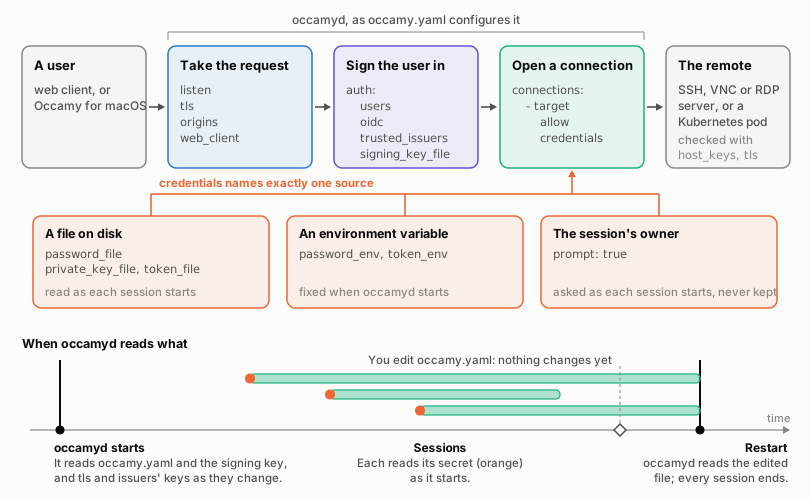
occamyd applies the file's three parts in turn to every request:
Where secrets come from
The file holds no secrets, so you can commit it and review each change
to it. Each secret stays in a file or a variable that the file names,
or with the session's owner, as the figure shows. occamyd refuses a
secret written into the file, such as password: under credentials
or client_secret: under auth.oidc, and its error names the keys to
use instead.
When a change takes effect
occamyd reads the file once, when it starts, and nothing reloads it,
so a change takes a restart, which ends every session. Users stay
signed in for as long as the signing key stays the same. What the file
points to is read when it's used:
| What | When occamyd reads it |
|---|---|
| The file itself and the signing key | When it starts |
tls.cert and tls.key |
When it starts, and again at the first connection after either changes. Connections already open keep the certificate they began with |
A trusted issuer's public_key_file |
When it starts, and again at the first token after it changes. From then on, tokens signed with its old key are refused |
Environment variables, such as password_env, token_env and auth.oidc.client_secret_env |
When it starts, since a process's environment doesn't change once it runs |
A connection's files: password_file, private_key_file, token_file, client_cert_file, client_key_file and tls.ca_file |
As each session on the connection starts. Running sessions continue with what they read |
auth.oidc.client_secret_file |
At each OIDC sign-in |
The web client's files, in web_client |
At each request, so a new build is served at once |
If a changed tls.cert, tls.key or public_key_file doesn't load,
occamyd keeps what it had and warns
(Warnings during a session).
How occamyd checks the file
occamyd checks the whole file when it starts, and doesn't start until
it's right. It reports every problem at once, each with its line and
key, so you can fix them all in one pass. This file has three:
version: 1
auth:
  signing_key_file: /var/lib/occamy/signing.key
  users:
    - name: alice
      password_hash: "$2y$12$…" # a whole hash
connections:
  - id: desktop
    protocol: vnc
    target: desktop.example.com
    credentails: {password_env: DESKTOP_PASSWORD}
    allow: {users: [carol]}
config: 3 problems:
    line 11: connections[0].credentails: unknown key, did you mean credentials?
    line 8: connections[0].credentials: no credential source: set one of password_file, password_env, private_key_file or prompt: true
    line 12: connections[0].allow.users[0]: no static user is named "carol"
The file holds one YAML document, and an unknown key is an error, so a
misspelt key is reported rather than ignored. occamyd has no default
user and no default password. Besides the rules that the
reference gives for each key, it checks these:
| What | What occamyd checks |
|---|---|
| Each file that the configuration names | It exists, is a regular file, and can be opened, which occamyd checks without reading a secret |
| A trusted issuer's public key | It parses |
| Each environment variable that the configuration names | It's set and isn't empty |
| Addresses, origins and OIDC URLs | Addresses are host:port with a numeric port, and origins and URLs parse |
| User, group and issuer names | They aren't empty, and have no spaces or control characters |
Allow lists, without auth.oidc and auth.trusted_issuers |
Every user is a static user, and every group is a static user's. With either, users and groups also come from tokens |
auth.oidc.require_known_users |
The file admits someone |
Add a connection
A connection is a remote computer that users open by its ID: an SSH
server, a VNC or RDP desktop, or a shell in a Kubernetes pod. occamyd
connects to each with a client of its own, called its backend, so
there is nothing else to install. Every connection has these keys:
connections:
  - id: lab-desktop            # what users open it by
    name: Lab desktop          # what they see
    protocol: vnc              # ssh, vnc, rdp or kubernetes
    target: lab.internal:5901  # host:port, or a host alone
    credentials: {password_file: /run/secrets/lab-vnc}
    allow: {groups: [lab]}     # who may open it
Each protocol adds keys of its own, which the sections below describe,
and a key on a connection of another protocol is an error.
connections in the reference gives each
key's form and default.
Credentials
On an SSH, VNC or RDP connection, whatever the source of its secret,
occamyd asks the session's owner for anything that the remote wants
and the file doesn't store, such as a password, a user name or a
one-time code:
flowchart LR
  start(["A session<br/>starts"]) -- "a file or<br/>a variable" --> read["occamyd reads<br/>the secret"]
  start -- "prompt: true" --> none["Nothing<br/>is stored"]
  read --> signin["occamyd signs in<br/>to the remote"]
  none --> signin
  signin -- "it asks for<br/>more" --> ask["The owner<br/>answers"]
  ask --> signin
  signin -- "accepted" --> runs(["The session<br/>runs"])
  signin -- "refused" --> fails(["The session ends,<br/>and says why"])
Use prompt: true also for a remote that needs no credentials.
credentials in the reference lists every source.
SSH
An SSH connection opens a shell on the server, which the web client shows as a terminal:
  - id: build-box
    protocol: ssh
    target: build.internal
    host_keys: ["SHA256:UtDMff7ThPohflGs6UL1iuiyvVrazbxQT9x0OtzIV7U"]
    credentials: {username: deploy, private_key_file: /etc/occamy/keys/deploy}
    allow: {groups: [ops]}
host_keys lists the only host keys that occamyd accepts from the
server, so that nobody between them can pose as it. Give each as a
public key, as ssh-keyscan prints it, or as its SHA256: fingerprint,
which this prints:
ssh-keyscan build.internal | ssh-keygen -lf -
For a demo, insecure_ignore_host_key
accepts any host key instead.
The connection needs a username unless it has prompt: true, which
asks the owner for one. occamyd signs in with the private key first,
then with the stored password, and asks the owner for a password only
when none is stored, and for the server's other questions, such as a
one-time code.
VNC
A VNC connection shows the desktop of a VNC server:
  - id: nas-desktop
    protocol: vnc
    target: nas.internal
    credentials: {password_env: NAS_VNC_PASSWORD}
    allow: {users: [alice]}
occamyd signs in with None, VNC Authentication or VeNCrypt. Of
VeNCrypt's types, it takes X509None, X509Vnc and X509Plain, which run
TLS and check the server's certificate as
Check a remote's certificate describes.
A username in credentials is for VeNCrypt's Plain type, which
occamyd then prefers to the server's other types. Without one, the
owner is asked for a user name if the server wants one.
The server's screen follows the size of the owner's window, where the server supports the ExtendedDesktopSize extension, and viewers see the server's cursor.
Apple Remote Desktop: ard
macOS Screen Sharing signs in a user of the Mac with Apple Remote
Desktop authentication, which is the only type it offers that a VNC
connection could use when the Mac's VNC password is off. ard: true
allows it, with the Mac account's name as username, and its password
from credentials or from the owner:
  - id: studio-mac
    protocol: vnc
    ard: true
    target: studio.internal:5900
    credentials: {username: studio, prompt: true}
    allow: {users: [alice]}
Warning
Apple Remote Desktop's key exchange doesn't authenticate the server.
Anyone between occamyd and the Mac can read the user name and the
whole password, which are the Mac account's own, and the session that
follows isn't encrypted. Set ard: true only for Macs on networks you
trust, such as a VPN to the Mac.
ard: true raises that risk on any server of the connection, not only
a Mac: the attacker can strip VeNCrypt from what the server offers and
offer Apple Remote Desktop alone, and occamyd then sends the whole
password. Without ard, the most that such a downgrade gets is VNC
Authentication's DES response, which comes from the password's first 8
bytes. For the same reason, ard can't be combined with a tls that
requires TLS (require, ca_file or pins).
Without ard: true, a Mac that offers only Apple Remote Desktop fails
the session, and occamyd's log names the key to set. An ad-hoc target
can't use Apple Remote Desktop.
RDP
An RDP connection shows a Windows or xrdp desktop, always over TLS.
security sets how it signs in:
security |
What it does |
|---|---|
nla |
NLA (CredSSP with NTLMv2) over TLS. The default |
nla-ext |
NLA with the early user authorization result only |
tls |
TLS without NLA, which sends the password to whichever server passes the certificate check |
any |
Offers TLS and NLA, and lets the server choose |
The names follow Guacamole's. NLA signs in with NTLMv2, not Kerberos,
so a domain that refuses NTLM refuses occamyd too. occamyd never
uses standard RDP security, which runs without TLS.
Credentials. A username of the form DOMAIN\user signs in to that
domain, and \user as the user alone. With NLA, the owner is asked for
the password, and for the user name and domain if no username is
stored, which they can type in the same form. Without NLA
(security: tls), nothing is asked, and a missing user name or
password leaves the server's own sign-in screen to the owner.
The screen. The server's desktop takes the size of the owner's
window, from 200 to 8192 pixels a side and at most 2²⁵ pixels in all,
and follows later resizes through the Display Control channel where the
server has it. Viewers scale a desktop that keeps another size. While no
viewer can see the session, occamyd asks the server to stop drawing.
Drawing. Through RDP's graphics pipeline (GFX), occamyd takes
surfaces, fills, copies, and bitmaps in the uncompressed, planar,
RemoteFX and RemoteFX Progressive codecs, but not ClearCodec, the
bitmap cache, or AVC (H.264), which it doesn't ask for. Without GFX, it
takes bitmap updates in interleaved RLE and planar.
Input. Keys go as scancodes of their physical key, text as Unicode keyboard events, and the pointer and wheel as mouse events.
Windows hosts
Set disable_gfx: true on a connection to a Windows host. Through GFX,
Windows draws nearly all of its screen with ClearCodec and its bitmap
cache, which occamyd doesn't decode, so the screen stays nearly
black. With disable_gfx: true, Windows sends plain bitmap updates, and
the whole desktop draws.
  - id: windows
    protocol: rdp
    target: 10.0.4.20
    disable_gfx: true
    tls: {pins: ["3F:A1:07:5C:92:E4:6B:D8:21:0A:F3:8E:57:C6:19:B4:E2:7D:40:95:A8:1C:6F:D3:0B:72:E9:58:34:AC:66:1F"]}
    credentials: {username: 'CORP\alice', password_file: /run/secrets/windows-password}
    allow: {users: [alice]}
Windows signs its RDP certificate itself unless you give it one, so pin
it by the fingerprint that the first refused session logs, as
Connect Windows hosts shows step by
step. An ad-hoc RDP target always asks for GFX, since only a connection
can set disable_gfx, so reach a Windows host through a connection.
xrdp
xrdp speaks no NLA. Offered NLA alone, it chooses standard RDP
security, which occamyd refuses, so set security: tls (or any) on
an xrdp connection; the session's error in the log names the key. The
password then goes to whichever server passes the certificate check, so
pin a self-signed certificate by its fingerprint. With
tls: {insecure_skip_verify: true}, the password may go to whoever is
in between, and occamyd warns of it by name when it starts.
Kubernetes pods
A Kubernetes connection opens a terminal in a pod's container through
the cluster's API server, as kubectl exec -it does:
  - id: web-shell
    protocol: kubernetes
    target: k8s.internal:6443
    kubernetes: {namespace: web, pod: web-0, container: app}
    tls: {ca_file: /etc/occamy/k8s-ca.crt}
    credentials: {token_file: /run/secrets/k8s-token}
    allow: {groups: [ops]}
The target is the API server's host:port, which occamyd always
reaches over HTTPS, so write it without https://. occamyd asks for
/api/v1/… at the root of the target, so it can't reach an API server
behind a path prefix, such as a cluster that Rancher proxies at
https://rancher.example/k8s/clusters/c-m-abc12. kubernetes names the
pod, and kubernetes in the reference lists its
keys.
Credentials. occamyd sends a bearer token or presents a client
certificate, and never a user name or a password. With prompt: true,
the owner is asked for a token, and an empty answer sends none.
occamyd sends the token only once it has accepted the API server's
certificate. A ServiceAccount token works on every cluster, managed
ones included. kubectl -n web create token occamy --duration=24h makes
one that expires, and a Secret of type
kubernetes.io/service-account-token holds one that doesn't.
occamyd takes no kubeconfig, and runs no credential program, so that
a session never starts a process on the server: neither a kubeconfig's
auth-provider entries, nor exec credential plugins such as EKS's
aws eks get-token or GKE's gke-gcloud-auth-plugin.
Permissions. The token's or the certificate's user needs get and
create on pods/exec, or on pods/attach with attach: true, in the
pod's namespace. API servers authorize the WebSocket upgrade, an HTTP
GET, as get, and from Kubernetes 1.35 they also check create. This
is a minimal Role and RoleBinding for a ServiceAccount:
apiVersion: v1
kind: ServiceAccount
metadata: {name: occamy, namespace: web}
---
apiVersion: rbac.authorization.k8s.io/v1
kind: Role
metadata: {name: occamy-exec, namespace: web}
rules:
  - apiGroups: [""]
    resources: [pods/exec]
    verbs: [get, create]
---
apiVersion: rbac.authorization.k8s.io/v1
kind: RoleBinding
metadata: {name: occamy-exec, namespace: web}
roleRef: {apiGroup: rbac.authorization.k8s.io, kind: Role, name: occamy-exec}
subjects:
  - {kind: ServiceAccount, name: occamy, namespace: web}
occamyd needs no other permission: it doesn't list or read pods.
The session. occamyd speaks the v5.channel.k8s.io WebSocket
protocol of Kubernetes 1.30 and later, and falls back to
v4.channel.k8s.io for older API servers. The command's exit ends the
session, whatever its exit status.
Check a remote's certificate
A VNC, RDP or Kubernetes connection checks the certificate of its
remote: a VNC server's when the server offers VeNCrypt, and the
others' always. Without tls, the certificate must chain to the
system's roots and name the target's host, as a browser checks it.
tls changes that check in one of three ways:
| To accept | Set |
|---|---|
| A certificate from a private CA | ca_file, the CA's certificates in PEM, which replace the system's roots |
| A self-signed certificate, such as Windows makes | pins, the certificates to accept as they are, with no check of their chain, names or dates |
| Any certificate, for a demo | insecure_skip_verify: true, which logs each certificate's fingerprint as a warning |
A refused certificate fails the session, and occamyd's log names its
fingerprint, ready to pin.
A VNC server that doesn't offer VeNCrypt runs without TLS, and an
attacker on the way can make any VNC server look like one by stripping
VeNCrypt from what it offers. require: true refuses a server without
VeNCrypt. RDP and Kubernetes connections always require TLS.
Close the clipboard
Clipboard text goes both ways between a desktop and the people in its
session unless you close it. disable_copy: true keeps text copied on
the remote there, and disable_paste: true keeps text copied on a
viewer's computer from the remote, though a viewer can still type it.
Neither key applies to a terminal, where the client copies the text
that it draws, and a paste reaches the terminal as typing.
Set up sign-in
Users sign in to occamyd in one of three ways, and you can allow any
of them together. They sign in with a password as static users, whom
the file lists; through your identity provider, with OpenID Connect
(OIDC); or they arrive with a token that a trusted issuer, such as a
gateway in front of occamyd, signed for them:
flowchart TD
  password["A password<br>auth.users"] --> own["An access token from occamyd,<br>signed with signing_key_file"]
  provider["Your identity provider<br>auth.oidc"] --> own
  gateway["A gateway's token, signed with its own key<br>auth.trusted_issuers"] --> user
  own --> user(["A user: a name, and groups,<br>which allow lists check"])
Add users with passwords
To add a static user, make a bcrypt hash of the password they chose,
and list the user under auth.users. htpasswd makes the hash:
htpasswd -nbBC 12 "" 'the password' | cut -d: -f2
auth:
  signing_key_file: /var/lib/occamy/signing.key
  users:
    - name: alice
      password_hash: "$2y$12$…"
      groups: [ops]
Put the line that htpasswd prints, which starts with $2y$12$, in
double quotes as the user's password_hash. htpasswd comes with
Apache's tools: apache2-utils on Debian and Ubuntu, httpd-tools on
Fedora and RHEL, and macOS has it.
Give every user the same bcrypt cost, the 12 after -C, of at least
10. occamyd checks a sign-in as an unknown user against a hash of the
highest cost, so a user with a lower cost signs in measurably faster,
which tells who exists. occamyd warns when it starts if the costs
differ.
Signing in through OIDC
occamyd signs users in at an OpenID Connect provider with the
authorization code flow and PKCE. Register occamyd at your provider
as such a client, with redirect_url as its redirect URI, and then add
auth.oidc:
auth:
  oidc:
    issuer: https://accounts.example.com
    client_id: occamy
    client_secret_file: /run/secrets/oidc-client-secret
    redirect_url: https://occamy.example.com/api/v1/auth/oidc/callback
    return_urls:
      - https://occamy.example.com/static/
      - de.changkun.occamy:/oidc
    groups_claim: groups
auth.oidc in the reference describes each key.
Return URLs. After a sign-in, occamyd sends the browser back to
the one of return_urls that the client named, with a one-time code or
an error in the URL's fragment. List the clients that your users have:
- The web client that
occamydserves returns to its own URL, under/static/, which the default return URL doesn't reach, so listhttps://<your host>/static/. - Occamy for macOS returns to
de.changkun.occamy:/oidc. List it to let the app sign in through OIDC.
The user's name. subject_claim names the top-level claim of the ID
token that holds the user's name. Its value must be a string of up to
255 bytes, of characters that show, with no space but U+0020, or
occamyd refuses the sign-in. Allow lists grant access by this name,
so pick a claim that users can't set themselves, such as sub or
email, and never a display name, or preferred_username where users
can edit it. With email, the ID token must also say
email_verified: true.
Groups. groups_claim names a top-level claim that holds the user's
groups, as a list of strings or one string. occamyd keeps only the
groups that the file names, in auth.users[].groups or in an
allow.groups.
Who gets in. By default, anyone whom the provider signs in gets an
access token, and allow lists still decide which connections they may
open. With require_known_users: true, occamyd admits a user only if
a connection's allow.users names them exactly, or one of its
allow.groups holds one of their groups from groups_claim. A static
user's name then admits someone only with link_static_users, without
which a static user's name is refused, as User names
describes.
The provider. occamyd discovers the provider in the background
when it starts, so a provider that is down doesn't keep occamyd from
starting: until it answers, OIDC sign-ins fail and static users sign in
as usual. It expects this of the provider:
| What | How occamyd treats it |
|---|---|
| Discovery | Retried at the first sign-in 10 seconds after a failure. Each request to the provider times out after 10 seconds |
| ID tokens | Accepted when signed with RS, ES or PS at 256, 384 or 512 bits, or with EdDSA. none and HMAC are refused, whatever the provider advertises |
| Endpoints | Only those that the discovery document names, over https, or http on localhost when the issuer uses it too. No redirect is followed |
The iss that the provider sends back (RFC 9207) |
Compared with issuer exactly. authorization_response_iss_parameter_supported counts only as a JSON boolean |
Errors. A failed sign-in returns to the return URL with #error=
and one of these codes:
error |
Meaning |
|---|---|
access_denied |
The provider refused the user, or occamyd did: a missing or unusable subject_claim, an unverified email, a static user's name without link_static_users, or a user that require_known_users doesn't admit |
sign_in_failed |
The provider answered with another error, or its answer didn't verify |
unavailable |
The provider can't be reached, or too many sign-ins wait for their clients |
The HTTP API describes the three OIDC routes and every answer they give.
How a client signs in
The web client and Occamy for macOS sign in through OIDC already. A client of your own takes these steps, in which only the client's verifier proves that the one-time code is its own:
sequenceDiagram
  participant C as Client
  participant O as occamyd
  participant P as Identity provider
  C->>O: GET /api/v1/auth/oidc/login, with return_url and a PKCE challenge
  O-->>C: 302 to the provider, and a sign-in cookie
  C->>P: The user signs in
  P-->>C: 302 to redirect_url, with a code
  C->>O: GET /api/v1/auth/oidc/callback
  O->>P: Exchange the code for an ID token
  P-->>O: ID token
  O-->>C: 302 to the return URL, with a one-time code in the fragment
  C->>O: POST /api/v1/auth/oidc/token, with the code and the verifier
  O-->>C: An access token
Sign in through OIDC in the HTTP API
gives each request. In a browser, keep the verifier in
sessionStorage, remove the fragment with history.replaceState once
you've read it, and forget the verifier once you have the access token.
A client that finds a #code but holds no verifier didn't start that
sign-in, so it must not sign in with the code: spend the code by posting
it with a throwaway verifier, since a code works once, or remove it
from the URL and ignore it.
The access token never appears in a URL, so it reaches no server log,
Referer header or browser history. A native app takes the same steps in a browser window of its own, such
as macOS's ASWebAuthenticationSession, keeps the verifier in memory,
and returns to a scheme of its own, a domain name in reverse, as RFC
8252 asks. Another app may claim the scheme, but the code it would
receive signs no one in without the verifier.
Tokens from a trusted issuer
A trusted issuer, such as a gateway in front of occamyd, signs in its
users itself, and mints tokens that occamyd accepts as its own. List
it with the name it puts in its tokens and its public key:
auth:
  trusted_issuers:
    - issuer: gateway
      public_key_file: /etc/occamy/gateway.pub
      allowed_groups: [ops]
The issuer's tokens are JWTs with these claims:
| Claim | What it holds |
|---|---|
alg, in the header |
EdDSA. The token is signed with the issuer's Ed25519 key, and no other algorithm |
iss |
The issuer's name, as issuer configures it |
aud |
occamy |
iat and exp |
When the token was issued and when it expires, at most 12 hours apart |
sub |
The user, a usable name by the rules of subject_claim |
kind |
access or session |
groups |
In an access token, optionally, the user's groups |
sid and role |
In a session token, the session's ID, and the role: owner, viewer or read-only |
occamyd drops every group that allowed_groups doesn't list, so
that an issuer can't claim ops and open every connection that allows
ops, with its stored credentials.
A session token joins only a session that one of the issuer's own users
opened, or, with link_static_users, a static user. An owner token
works only when its sub is the session's owner. occamyd refuses a
trusted issuer's token that sets uiss, and a session token from it
that carries idp. A sub that is a static user's name is refused with
invalid_token, or on a stream with a close of unauthorized, unless
the issuer has link_static_users: true (User names).
User names
A user is a name from one source: a static user, a user from OIDC, or a
user of one trusted issuer. The gateway's carol and occamyd's
carol are two users, and neither reads, closes, shares or owns the
other's sessions.
Allow lists compare names exactly, byte for byte, whichever source
signed the user in. allow.users: [alice] admits neither Alice nor an
alice with a decomposed character, so write names as the provider
sends them.
A name from OIDC or a trusted issuer is refused when it equals a static
user's under Unicode case folding, once both are in NFC, so that
Alice can't pass for the static user alice in a log or to a person.
With link_static_users on the OIDC provider or the issuer, the exact
name signs in as that static user: it shares the static user's place in
every allow list, and their sessions, but takes its groups from its own
token or groups_claim. Another case or form is then a user of its
own. Link names only from a subject_claim that users can't choose,
such as sub or a verified email.
Names that only look alike, such as one with a Cyrillic а or a
fullwidth a, are neither refused nor the same user, which is one more
reason to pick such a claim.
The signing key
occamyd signs its tokens with the Ed25519 key in
auth.signing_key_file. Keep it at /var/lib/occamy/signing.key, on a
persistent volume.
Important
Whoever holds the signing key can make a token for any user. Keep the
file readable by occamyd's user alone, and
rotate it if it may have leaked.
If the file doesn't exist, occamyd creates it when it starts,
readable by its owner alone (0600), through a temporary file in the
same directory, so the directory must exist and occamyd's user must be
able to write to it. Tokens stay valid across a restart for as long as
the file does. If the file is lost, everyone signs in again, and
occamyd warns created a new signing key
(Warnings at start).
If occamyd may not read the key or write to its directory, it stops
at start and names the user it runs as. Give the directory, or what is
mounted on it, to that user. The path in the error is the one that
occamyd sees, which in a container isn't a path on the host.
| Where the key is | What to run, with the uid from the error (65532 in the image) |
|---|---|
| A directory, with no container | sudo chown -R <uid> <the directory> |
| A host directory mounted into Docker or rootful Podman | sudo chown -R 65532 <the directory on the host> |
| A host directory mounted into rootless Podman | podman unshare chown -R 65532 <the directory on the host> |
| A named volume on Docker | docker run --rm -v <the volume>:/data busybox chown -R 65532 /data |
| A named volume on Podman | podman run --rm -v <the volume>:/data busybox chown -R 65532 /data |
With rootless Podman, a plain chown is wrong: uid 65532 in the
container is another number on the host, such as 165531, and
podman unshare translates it. A named volume keeps its owner once it
holds files. An empty volume that a root container used first stays
root's on Docker, while on Podman it takes the owner of the next
container that uses it.
Rotate keys and secrets
Rotate the signing key
occamyd holds one signing key at a time, so a new key signs everyone
out. To rotate it:
- Stop
occamyd. -
Move the old key out of the way, or delete it. To use a key that you made yourself, put it in its place, readable by
occamyd's user alone:openssl genpkey -algorithm ed25519 -out signing.key -
Start
occamyd. Without a key of yours, it creates one and warnscreated a new signing key, which this time you expect.
Rotate other secrets
A new secret takes effect when occamyd next reads it, which
When a change takes effect lists. Write
a new file beside the old one and rename it into place, so that a
session that starts at that moment never reads half a file.
Put Occamy behind a proxy
A reverse proxy in front of occamyd holds the certificate and serves
HTTPS, and occamyd serves plain HTTP to the proxy alone:
flowchart LR
  users["Browsers and<br>Occamy for macOS"] -- "HTTPS and WebSockets" --> proxy["Reverse proxy<br>occamy.example.com"]
  proxy -- "HTTP, with the Host header" --> occamyd["occamyd<br>127.0.0.1:5636"]
  occamyd --> remotes["Remote computers"]
Serve it over TLS sets up the proxy, for
Caddy and nginx. In occamyd's file, listen where only the proxy reaches, leave tls
unset, and give OIDC the URLs as browsers reach them through the proxy:
listen: 127.0.0.1:5636
auth:
  oidc:
    redirect_url: https://occamy.example.com/api/v1/auth/oidc/callback
    return_urls:
      - https://occamy.example.com/static/
If the proxy rewrites the Host header, also list the address that
your users open in origins.
Limit who can do what
Occamy has no administrator role. What a user may do follows from the file: the connections whose allow lists admit them, ad-hoc targets if you allow them, and limits on how much each user can hold. Within a session, its owner decides who else joins, by sharing it.
Who may open a connection
A connection's allow lists the users, and the groups, who may open
it:
flowchart LR
  user["A signed-in<br/>user"] --> name{"In<br/>allow.users?"}
  name -- no --> group{"A group in<br/>allow.groups?"}
  name -- yes --> open(["Sees the connection<br/>and may open it"])
  group -- yes --> open
  group -- no --> absent(["The connection is<br/>hidden, as if it<br/>didn't exist"])
A user's groups depend on how they signed in:
| Signed in with | Groups |
|---|---|
| A password | The user's groups in auth.users |
| OIDC | The groups in the ID token's groups_claim that the file names, in auth.users[].groups or an allow.groups |
| A trusted issuer's token | The token's groups that the issuer's allowed_groups lists |
Ad-hoc targets
An ad-hoc target is a remote that isn't a connection, which a
signed-in user names when they open a session. Ad-hoc targets are off
until you set allow_adhoc_targets: true, and then adhoc_allowlist
says where they may point:
allow_adhoc_targets: true
adhoc_allowlist:
  - 10.0.0.0/8:22               # SSH, to any address in the range
  - "*.lab.internal:5900-5910"  # VNC, to the lab's hosts
  - build.internal              # the protocol's own ports
adhoc_allowlist in the reference lists the
forms that an entry takes. occamyd checks a target like this:
flowchart LR
  ask["A protocol,<br/>a host and<br/>a port"] --> each["Each of the<br/>host's addresses"]
  each --> allowed{"Allowed by<br/>an entry?"}
  allowed -- no --> refused(["Refused"])
  allowed -- yes --> special{"A special<br/>address?"}
  special -- no --> dial(["occamyd connects,<br/>and asks for<br/>credentials"])
  special -- yes --> exact{"An entry is that<br/>very address?"}
  exact -- yes --> dial
  exact -- no --> refused
A host name is allowed when an entry names it, or when it ends in a
*. entry's domain: a.lab.internal for *.lab.internal, but not
lab.internal itself. Any other host name is allowed when every address
it resolves to lies in a listed range, and occamyd dials the address
it checked, so that a second lookup can't lead elsewhere.
The special addresses are loopback, link-local, unspecified and
multicast addresses, the cloud metadata services at 169.254.169.254,
fd00:ec2::254 and 100.100.100.200, and occamyd's own listen and
debug.address at their ports, where a listener on no host, such as
:5636, stands for every address of the host. An entry that is that
very address allows it, such as 127.0.0.1:2222.
Warning
A range that holds the host's own addresses still reaches the host's other services on the ports it allows, such as a database on a private address. List ranges that leave the host out, or the host's addresses with the ports you mean.
A user opens an ad-hoc target of any protocol but Kubernetes, and
occamyd always asks them for its credentials.
Ad-hoc targets in the HTTP API describes the
request, and how each protocol checks the remote. An ad-hoc VNC target can't require TLS, so an attacker in
between can strip VeNCrypt from the server's offer and capture the VNC
Authentication response, from which an offline search can recover a
weak password: reach targets across networks you don't trust through a
connection whose tls requires TLS. An ad-hoc RDP target signs in with
NLA alone. Without a username in the request, the user is asked for
the user name and domain too, and with one, DOMAIN\user names the
domain. It always asks for GFX, so a
server with a self-signed certificate, an xrdp server, or a
Windows host needs a connection.
Limit sessions, viewers and shares
limits bounds what one user, one session or occamyd as a whole may
hold, so that no user takes what the others need:
limits:
  sessions: 1000           # sessions that occamyd runs at once
  sessions_per_user: 10    # sessions that one user owns at once
  viewers_per_session: 50  # viewers besides the owner, who can always join
  shares_per_session: 100  # shares of a session that haven't expired
These are the defaults. A user counts by name and source, so a trusted
issuer's users count apart from occamyd's own, and limits.sessions
holds even when a trusted issuer names new users without end.
The HTTP API lists what a client gets at each limit.
Limit the cores that RDP sessions take
An RDP session may take about a core to decode what its server sends,
so one user's 10 sessions to hostile servers, such as ad-hoc targets
they chose, could take about 10 cores. limits.decode_cores caps all
RDP sessions together at about that many cores, by default half the
cores that occamyd may use, which leaves the rest to encoding for
viewers. Raise it where many sessions show full-screen motion, which
takes about 0.8 of a core each at 1920 × 1080 and 30 frames a second,
and lower it on a host that does other work.
A session over its share waits, with its server's updates queued
behind it, and nothing is dropped. Of n sessions that want more than
the cap, each gets at least an nth of it, or a core if that's less, and
what a session leaves goes to the others. The share is a session's, not
a user's, so where you don't trust users with 10 shares, lower
limits.sessions_per_user, or keep allow_adhoc_targets off. The cap
doesn't count what sessions read and ignore, so a server that floods a
session with what the client doesn't ask for, such as updates of an
unknown kind, can keep that session's reader busy outside it.
Limit the memory that viewers hold
Each visible viewer holds the screen that it was last sent until it
acknowledges a newer one, and a viewer that may type also holds the
screen of its last input, hidden or not. The largest terminal, 1000 by
500 cells, takes about 11 MiB a screen. streams.viewer_timeout drops a
viewer that stops acknowledging, but one that keeps acknowledging keeps
its screens for as long as it stays. At the defaults, one user's 10
sessions, with their owners and 50 viewers each, may hold 510 such
screens, about 5.5 GiB, or twice that if every viewer may type. Where
you don't trust users with that much, lower
limits.viewers_per_session or limits.sessions_per_user.
Reference
Each key below has one of these types:
| Type | What to write |
|---|---|
| string | Text, such as alice |
| boolean | true or false |
| integer | A whole number, such as 10 |
| duration | A number with a unit, such as 30s, 15m or 1h30m |
| path | A file or directory, relative to occamyd's working directory unless it starts with / |
| address | host:port, such as 127.0.0.1:5636. An empty host, as in :5636, means every address |
| URL | An absolute URL, such as https://occamy.example.com/static/ |
| variable | The name of an environment variable, such as NAS_VNC_PASSWORD |
| list | A YAML list, such as [ops, lab], of the type that the key names |
| mapping | A YAML mapping, of the keys that its own table lists |
A key that you leave out takes its default. A required key has no
default, and occamyd refuses a file without it.
Server
| Key | Type | Default | Description |
|---|---|---|---|
version |
integer | required | The file's version, always 1 |
listen |
address | :5636 |
Where occamyd serves the HTTP API, the streams, the web client and /healthz, over HTTP/1.1 only, since the streams are WebSockets over HTTP/1.1. Example: 127.0.0.1:5636 |
tls.cert |
path | none | A certificate, with its chain, in PEM. With tls.key, occamyd serves HTTPS, with TLS 1.2 and later. Without them, it speaks plain HTTP, for a proxy to serve TLS. Set both or neither |
tls.key |
path | none | The certificate's private key, in PEM |
web_client |
path | none | The directory of the built web client, which occamyd serves under /static/: client/occamy-web/dist in the image, or the dist directory of a release's web client archive. Without it, occamyd serves no web client |
origins |
list of strings | none | Other origins whose web pages may open streams, as scheme://host or scheme://host:port |
congestion_control |
string | bbr |
The TCP congestion control of the listener's connections, on Linux: see TCP congestion control |
debug.address |
address | none | The address of the debug listener, which is off without it. Example: localhost:6060 |
debug.address_env |
variable | none | A variable that holds the debug listener's address, in place of debug.address. While it's unset or empty, the listener stays off, so one file serves with the listener and without it |
The web client. A web_client that isn't a directory, or that
occamyd can't read, is an error. A directory that doesn't exist yet,
or has no index.html, gets a warning at start, and occamyd serves
the client once it's built there.
Origins. A browser sends the origin of the page that opens a
stream, and occamyd refuses an origin it doesn't know. It knows its
own: an origin whose host and port are the request's Host, with the
scheme https when occamyd serves TLS, and either scheme when it
doesn't, since a proxy in front may. Behind a proxy that rewrites
Host, list the address that your users open in origins. A stream
request without Origin, which no browser sends, is accepted on its
token alone, while an empty, repeated or null origin is refused.
The debug listener. It serves counters and profiles without
authentication (The debug listener),
so keep it on the loopback interface, such as localhost:6060;
occamyd warns at start when it isn't. Give it a port of its own:
occamyd refuses a debug address on listen's port when the two could
take the same connections, such as localhost beside 127.0.0.1 or
::1, or when either listens on every address, such as :5636. Set
debug.address or debug.address_env, not both.
TCP congestion control
On Linux, congestion_control names the TCP congestion control that
occamyd asks for on its listener, and every connection it accepts
inherits it. On other systems, the key has no effect.
| Value | What occamyd does |
|---|---|
bbr |
Asks for BBR, which keeps a desktop's frame rate on a link that loses packets. The default |
Another name that the kernel knows, such as cubic |
Asks for that one |
system |
Keeps the kernel's choice without asking |
A name has at most 15 lower-case letters, digits and underscores. When
the kernel refuses the name, occamyd keeps the kernel's choice and
warns at start. Deploy shows how to
load BBR and check which one the connections use.
Sign-in: auth
| Key | Type | Default | Description |
|---|---|---|---|
auth.signing_key_file |
path | required | The Ed25519 key with which occamyd signs its tokens, in PKCS #8 PEM. occamyd creates it if it doesn't exist |
auth.access_token_lifetime |
duration | 15m |
How long an access token from occamyd lasts, from 1m to 12h. Example: 1h30m |
auth.users |
list of users | none | Static users, who sign in with a password |
auth.oidc |
mapping | none | Sign-in through an OpenID Connect provider |
auth.trusted_issuers |
list of issuers | none | Third parties whose tokens occamyd accepts |
Set at least one of auth.users, auth.oidc and
auth.trusted_issuers. Without them, nobody could sign in, and
occamyd refuses to start.
auth.users
Each entry of auth.users is a static user:
| Key | Type | Default | Description |
|---|---|---|---|
name |
string | required | The name the user signs in with: unique, without spaces, and at most 255 bytes of characters that show |
password_hash |
string | required | The bcrypt hash of the user's password, starting with $2a$, $2b$ or $2y$, at cost 10 or more |
groups |
list of strings | none | The groups that the user belongs to |
auth.oidc
| Key | Type | Default | Description |
|---|---|---|---|
issuer |
URL | required | The provider's issuer URL, exactly as its discovery document names it, trailing slash included. It uses https, or http on localhost |
client_id |
string | required | occamyd's client ID at the provider |
client_secret_file |
path | none | A file of at most 64 KiB that holds the client secret |
client_secret_env |
variable | none | A variable that holds the client secret. Set it or client_secret_file, or neither for a public client |
redirect_url |
URL | required | occamyd's callback, /api/v1/auth/oidc/callback, as browsers reach it, over https, or http on localhost |
return_urls |
list of URLs | redirect_url's origin, with the path / |
Where browsers go back to after signing in, matched exactly as written. Each uses https, or http on localhost, or an app's own scheme, which must be a domain name in reverse, and holds no user name or fragment |
scopes |
list of strings | [openid, profile, email] |
The scopes to ask for, which must include openid |
subject_claim |
string | sub |
The ID token's claim that names the user |
groups_claim |
string | none | The ID token's claim that lists the user's groups. Without it, users from the provider have no groups |
require_known_users |
boolean | false |
Admit only users whom an allow list names, by name or group |
link_static_users |
boolean | false |
Let a user whose name is exactly a static user's sign in as that static user |
auth.trusted_issuers
Each entry of auth.trusted_issuers is a third party whose tokens
occamyd accepts:
| Key | Type | Default | Description |
|---|---|---|---|
issuer |
string | required | The unique name that the issuer puts in iss, other than occamyd's own, occamy |
public_key_file |
path | required | The issuer's Ed25519 public key, in PKIX PEM |
link_static_users |
boolean | false |
Let the issuer's tokens act for the static user that sub names exactly |
allowed_groups |
list of strings | none | The groups that the issuer's tokens may claim. occamyd drops the others |
Connections: connections
Each entry of connections is a remote that users may open:
| Key | Type | Default | Description |
|---|---|---|---|
id |
string | required | A unique ID of 1 to 64 lower-case letters, digits, ., _ and -, starting with a letter or digit |
name |
string | the ID | The name that users see |
protocol |
string | required | ssh, vnc, rdp or kubernetes |
target |
string | required | host:port, or a host alone for the protocol's port: 22 for SSH, 5900 for VNC, 3389 for RDP and 443 for Kubernetes. An IPv6 address alone takes that port too, such as fd00::22, and goes in brackets with a port, in quotes, since YAML reads a value that starts with [ as a list: "[fd00::22]:2222" |
credentials |
mapping | required | How occamyd signs in to the target |
allow.users |
list of strings | none | The users who may open the connection, by exact name |
allow.groups |
list of strings | none | The groups whose users may open the connection. allow needs at least one user or group |
host_keys |
list of strings | required for ssh, unless insecure_ignore_host_key |
SSH only. The host keys that occamyd accepts from the server |
insecure_ignore_host_key |
boolean | false |
SSH only. Accept any host key instead, for demos, and log its fingerprint as a warning. Set it or host_keys, not both |
tls |
mapping | the system's roots | VNC, RDP and Kubernetes only. How occamyd checks the remote's certificate |
ard |
boolean | false |
VNC only. Allow Apple Remote Desktop authentication |
security |
string | nla |
RDP only. How the connection signs in: nla, nla-ext, tls or any |
disable_gfx |
boolean | false |
RDP only. Don't ask for RDP's graphics pipeline, as Windows hosts need |
disable_copy |
boolean | false |
VNC and RDP only. Keep the remote's clipboard from the session's viewers |
disable_paste |
boolean | false |
VNC and RDP only. Keep the viewers' clipboard from the remote |
kubernetes |
mapping | required for kubernetes | Kubernetes only. The pod to open a terminal in |
credentials keys
credentials holds an optional username and exactly one source: a
password file or variable, a private key, a token file or variable, a
client certificate with its key, or prompt: true.
| Key | Type | Default | Description |
|---|---|---|---|
username |
string | none | The user to sign in as. SSH, VNC and RDP only |
password_file |
path | none | A file of at most 64 KiB that holds the password, without its trailing line breaks |
password_env |
variable | none | A variable that holds the password, set and not empty |
private_key_file |
path | none | SSH only. A private key without a passphrase, readable by occamyd's user alone |
token_file |
path | none | Kubernetes only. A file of at most 64 KiB that holds a bearer token, without its trailing line breaks |
token_env |
variable | none | Kubernetes only. A variable that holds a bearer token, without its trailing line breaks |
client_cert_file |
path | none | Kubernetes only. A client certificate in PEM, with client_key_file |
client_key_file |
path | none | Kubernetes only. The client certificate's key, in PEM |
prompt |
boolean | false |
Store nothing: the session's owner is asked for what the target needs, and the answers aren't kept |
tls keys
| Key | Type | Default | Description |
|---|---|---|---|
require |
boolean | false |
Refuse a VNC server that offers no VeNCrypt with a certificate. ca_file and pins imply it |
server_name |
string | the target's host | The name that the certificate must carry |
ca_file |
path | none | PEM certificates of the CAs that replace the system's roots, such as a private CA |
pins |
list of strings | none | Certificates accepted as they are, each in PEM or as its SHA-256 fingerprint: in hex, as openssl x509 -noout -fingerprint -sha256 prints it, or in base64 after SHA256: |
insecure_skip_verify |
boolean | false |
Accept any certificate, for demos, and log its fingerprint as a warning |
Set at most one of ca_file, pins and insecure_skip_verify.
kubernetes keys
| Key | Type | Default | Description |
|---|---|---|---|
namespace |
string | default |
The pod's namespace |
pod |
string | required | The pod's name |
container |
string | the pod's only container | The container's name. The API server refuses a stream to a pod with more than one without it, since it doesn't read kubectl's default-container annotation |
command |
list of strings | bash, or sh where the image has no bash |
What runs, one element per argument. Example: [/bin/ls, -l] |
attach |
boolean | false |
Attach to the container's main process instead of running a command, as kubectl attach -it does |
tty |
boolean | true |
Run the command in a terminal |
The names must be valid Kubernetes names: lower-case letters, digits
and -, and also . in a pod's name. Because attach runs no
command, set attach or command, not both. An attached container
needs stdin: true in its spec, and tty: true unless tty is
false. Without a terminal, the command's output and errors show
together, and resizes aren't sent.
Ad-hoc target keys
| Key | Type | Default | Description |
|---|---|---|---|
allow_adhoc_targets |
boolean | false |
Let signed-in users open ad-hoc targets, remotes that aren't connections |
adhoc_allowlist |
list of strings | none | Where ad-hoc targets may point, and on which ports. Required with allow_adhoc_targets |
Each entry of adhoc_allowlist is one of these, with an optional
:port or :first-last after it. An entry without ports allows the
protocol's own: 22 for SSH, 5900 to 5999 for VNC, and 3389 for RDP. Put
an entry that starts with * or [ in quotes, since YAML would read
it as something else.
| Entry | Example |
|---|---|
| A CIDR range | 10.0.0.0/8, 10.0.0.0/8:22 |
| An IP address | 10.0.4.20:3389 |
| A host name | build.internal |
*. and a domain, in quotes |
"*.lab.internal:5900-5910" |
| An IPv6 range or address, in brackets with ports, in quotes | "[fd00::/8]:22" |
Limits: limits
| Key | Type | Default | Description |
|---|---|---|---|
limits.sessions |
integer | 1000 |
Sessions that occamyd runs at once, whoever owns them |
limits.sessions_per_user |
integer | 10 |
Sessions that one user owns at once |
limits.viewers_per_session |
integer | 50 |
Viewers that a session takes besides its owner, who can always join |
limits.shares_per_session |
integer | 100 |
Shares of a session that haven't expired |
limits.decode_cores |
integer | half the cores occamyd may use (Go's GOMAXPROCS), at least 1 |
Cores of decoding that all RDP sessions share |
0 stands for the default, and a negative number is an error.
Streams: streams
| Key | Type | Default | Description |
|---|---|---|---|
streams.viewer_timeout |
duration | 30s |
How long, at least 1s, a viewer may leave its frames unacknowledged, or one write to it blocked, before it gets close with too-slow. See Limit the memory that viewers hold |
Upgrading
A release can rename or remove a key. occamyd then refuses the old
key and says what to write instead, so read its errors after an
upgrade. Deploy shows how to move a running server
to a new release.
v0 files
Version 1.0.0-beta.2 removed the v0.x files, which have no version
key, together with guacd, which served all their sessions. occamyd
refuses such a file:
config: the file has no version: 1; occamyd reads only version 1 files since v1.0.0-beta.2, and serves no v0 file: write a version 1 file, as docs/configuration.md describes
Any version other than 1 is an error too. A v0 file's keys map to
these:
| v0 | Version 1 |
|---|---|
address |
listen |
mode: debug |
debug.address, a listener of its own |
auth.jwt_secret, auth.jwt_alg |
auth.signing_key_file, an Ed25519 key, with users who sign in as Set up sign-in describes |
client |
web_client |
guacd |
None: occamyd serves ssh, vnc, rdp and kubernetes itself |
| A v0 token's target | A connection in connections, or an ad-hoc target |
Files written for guacd
Version 1.0.0-beta.2 also removed guacd, and telnet, which only guacd
served. occamyd refuses a version 1 file that still configures them,
and names each key with what replaced it:
| Written for guacd | Now |
|---|---|
guacd, a connection's backend, and adhoc_backends |
Removed, since occamyd serves each protocol itself |
guacd's ignore-cert and cert-fingerprints |
tls, which checks a VNC or RDP server's certificate against the system's roots unless it says otherwise. Pin a self-signed certificate with tls.pins, by the fingerprint that the refusal logs |
guacd's security |
security, NLA by default. An xrdp target needs security: tls |
guacd's disable-gfx |
disable_gfx. A connection asks for the graphics pipeline unless it's set |
guacd's disable-copy and disable-paste |
disable_copy and disable_paste on each VNC and RDP connection |
legacy_v0 |
Removed. The v0 routes are gone, and clients use API v1 and protocol v1 |
| A telnet connection | Removed. Telnet is gone |
occamyd records no sessions, so a file that sets one of guacd's
recording parameters under guacd.params, such as recording-path or
another recording- or typescript- parameter, is refused rather than
served unrecorded. guacd's disable-copy and disable-paste are
refused too, so that no clipboard opens that the file closed. A file
whose RDP connection went through guacd, with recording on and copying
off, is refused with:
config: 4 problems:
    line 7: guacd: guacd was removed in v1.0.0-beta.2: remove guacd, and occamyd serves ssh, vnc, rdp and kubernetes with its own backends
    line 10: guacd.params.rdp.recording-path: occamyd records no sessions until a later beta: guacd recorded them, and was removed in v1.0.0-beta.2; occamyd does not serve unrecorded what a file wants recorded, so remove the parameter to serve the sessions unrecorded, or keep v1.0.0-beta.1 until recording returns
    line 11: guacd.params.rdp.disable-copy: guacd was removed in v1.0.0-beta.2: set disable_copy: true on each vnc and rdp connection whose clipboard stays with the remote; occamyd does not open a clipboard that a file closes
    line 15: connections[0].backend: guacd was removed in v1.0.0-beta.2: remove backend, and the connection's protocol is served by occamyd's own backend
Remove the recording parameters to serve the sessions unrecorded, or keep version 1.0.0-beta.1, which records them through guacd.